I'm dedicated to bringing the latest in video games, entertainment and technology news. Follow me on instagram - jetrecords266 Follow me on twitchtv - twitch.tv/jetrecords Follow me on youtube - jetrecords226 or jetrecords266
Showing posts with label 7 days to Die. Show all posts
Saturday, January 13, 2018
Why Does 7 Days to Die on Xbox One Suck Compared to PS4?
Has anyone else noticed the BIG difference between the game play and look of 7 Days to Die on Xb?ox One vs PS4?
I play 7 Days to Die on Xbox One, but I see videos of the game on PS4, and I feel swindled! The Xbox One version of 7 Days to Die is like the alpha 15 or 16 version of the game that came out 2-3 years ago. The PS4 version of 7 Days to Die is alpha 17 which is the new version and similar to the current PC version.
It really upset me that I'm missing out on several new zombies, building types, weapons, base defenses, animals, bandits, traders, points of interests, clothes, tools, graphics and more. It basically a whole other game. I wish I could file a complaint with TellTale games for half assing the development of the Xbox One version of the game.
TellTale games needs to stop being lazy and really update the Xbox One game the way its PS4 developer has. It really makes me not want to play the Xbox One version b/c it feels like i'm playing a Nintendo 64 version of 7 Days to Die when a PS4 version is out.
I'm not joking or being dramatic. For example golden rod and cotton looks like a picture on Xbox One, but on PS4 it looks like a real plant.
Tuesday, September 12, 2017
7 Days to Die Xbox One Alpha 16 Update - 10.16.1
Hello 7 Days to Die gaming community. I am one of the few 7 Days to games that play the Xbox version. Although this version of 7 Days to Die was made by Tell Tale games and the funpimps, Xbox one did have the current updates.
Well finally to atone for my sins of protesting, my prayers and complaints have been answered. The developers finally released patch 10.16.1 which is alpha 16. So far all i have seen is trader joe has been added to the game. There are a few zombies inside of buildings, new items to craft up, and skyscappers like apartments. The new zombies have not been added to this update unfortunately.
If you would like to see the game and all the updates then feel free to tune in to my broadcast at twitch.tv/jetrecords or youtube.com/jetrecords226
Thursday, April 7, 2016
7 Days to Die + Walking Dead + Xbox One + PS4
Big News! 7 Days to Die is heading to the Xbox One and PlayStation! In conjunction with TellTale games and Fun Pimps, a new console version of 7 Days to Die will give gaming fans who do not have a good computer with high speed processors or graphics the opportunity to play and join the survivalist community.
Fans who pre-order the game you will have the opportunity to download 5 character skins from Telltale's The Walking Dead Series including Lee Everett and Michonne. There will be a hard-disk version of the game as well as a downloadable version as well.
The console version will be available in June 2016 selling at $30 on $29.99. I'm not sure what Alpha it will be. I doubt the Fun Pimps will release a new Alpha 15.0, so expect a polish version of Alpha 14.0.
The console version will support a multi-player split screen mode, plus additional mode will be announced as they become available. There will be different kinds of animals and meats as well.
For my fans that do not know about the game, 7 Days to Die is set in a post-apocalyptic world overrun by zombies. Telltale describes the title as an open-world survival game that combines first-person shooting, survival horror, tower defense, crafting and role-playing elements.
I didn't think this would happening since 7 Days to Die is a niche underground game. I'm shocked and excited about this. It makes sense because the Fun Pimps work hard and want to make a lot of money for their efforts. For those of you who don't have good computers, welcome to the fold. Enjoy!
Sunday, April 3, 2016
7 Days to Die Alpha 14.1, 14.2, and 14.3 Patch Updates
Hey Fellow Survivalist,
Tonight is The Walking Dead episode season finale. I can't wait to see Negan introduction, but I feel sorry for Glenn Rhee. For us zombie survivalist getting some live action in 7 Days to Die Alpha 14, here is some good news for you. They fixed most the alpha 14 bugs that went wrong. The Fun Pimps have been continuing to improve alpha 14 so here is another round of fixes. They are developing a venomous rattlesnake, and anti-venom to add a new challenge to survival. Again thanks to the community for helping find and report the issues.
For those who have reported crashes please try updating your video card drivers, cleaning out your files in your C:\Users\name\AppData\Roaming\7DaysToDieAppData folder and reinstalling the game. Note this is should be compatible with your A14, 14.1 and 14.2 saved games. We apologize for any of you who are still having trouble running the game. We appreciate your patience and any information you can provide us in fixing the problems. We believe the crashes are Unity related.
Alpha 14.3 Patch notes
Added
- Added: progress bars to skills in the skill screen to show current level and xp to next level.
- Added: Skill group category groups icons and sorted all skills and perks into these groups; All, Firearms, Weapons, Tools/Traps, Clothing, Scavenging, Health/Fitness and Crafting Miscellaneous.
- Added: You can craft Destroyed Stone to backfill holes while mining.
- Added: New larger iris overlay for female Asian.
- Added: New female base texture for the Asian head with lower slanting eyebrows, less lipstick and more eyeshadow used on Grace. Damn she’s hot now!
- Added: New male and female T-Shirts and Sweatshirts to the game. They come in the standard variety of colors and can be found in loot.
- Added: 90-minute day option.
Changed
- Changed: Hazmat suit is now clothing. Leg and chest armor is allowed to be worn with it.
- Changed: Updated weather to lead up to storms more predictably.
- Changed: Slightly reduced headshot multiplier on arrows/bolts.
- Changed: Bow and crossbow are no longer 100% accurate.
- Changed: Slightly reduced headshot multiplier on arrows/bolts.
- Changed: Bow and crossbow are no longer 100% accurate.
- Changed: Thickened female eyebrow texture to compensate for cutout shader change.
- Changed: Weapon crosshairs are bolder so you can see them easier in daylight and snow areas better.
- Changed: replaced bookcase textures.
- Changed: Updated eye texture, better specular highlight and removed eye size limitation(Joel)
- Changed: Deleted unused eye textures (Joel)
- Changed: Updated Asian heads to support facial animation.
- Changed: Updated all male face meshes, beards and hair for better facial animation.
- Changed: Steel/concrete perks: Only the key items are gated.
- Changed: Forged iron/steel can rarely be found as loot or harvested. A full nomadic playstyle without forge is now possible.
- Changed: Improved adjusted third person torch lighting.
- Changed: Flagstone is crafted from and repaired with Cobblestone Rocks.
- Changed: reorganized clothing loot lists.
- Changed: Zombie footsteps are louder.
- Changed: Wind now stops moving grass & trees when it has snowed (does not affect snow biome trees without new fallen snow)
- Changed: All buffs use and display real-time minutes or seconds.
- Changed: Harvesting an engine from a car wreck is more likely.
- Changed: Knocking down doors gets you some resources.
- Changed: Hornets always harvest for honey.
- Changed: Barbed wire fences can be disassembled with a wrench.
Fixed
- Fixed: Incorporated several “Unofficial XML Fixes” (Thanks guys)
- Fixed: Corrected inverted XP on bolts and arrows.
- Fixed: Lowered delay on the steel pickaxe.
- Fixed: Plate mines can be picked up (until we have a better mechanic)
- Fixed: Model can be placed in a way that causes it to levitate above the ground.
- Fixed: Damage popup on multi-block models only on parent block.
- Fixed: Repairing bow is worse than crafting a new one.
- Fixed: Wooden bow makes no sound when it breaks.
- Fixed: Medicine skill provides a better bonus than promised.
- Fixed: Femur is not harvested from animal gore.
- Fixed: Crafting skills show wrong details when switching between them.
- Fixed: All types of ammunition are flying through the bottom of river or lake.
- Fixed: Players have bad indications of how much time is left to be underwater.
- Fixed: Afro hair showed hard edges on cutout, adjusted cutout shader.
- Fixed: Dreadlocks do not display correctly when no helmet is worn.
- Fixed: Color om dreadlocks now works and adjusted specular on both dreadlock and hat dreadlocks textures.
- Fixed: Ball caps too shiny.
- Fixed: Recipe search resets after clicking on Favorite.
- Fixed: Commercial doors and refrigerator lighting.
- Fixed: Over bright flashlight attachment to pistol.
- Fixed: Improved female face rig, eyes can now look around and facial expressions are better.
- Fixed: Deleted old unused hair textures.
- Fixed: Upgrade path of Rebar Frame Pillar 100
- Fixed: Iron Sledgehammer – Sound effect is not realistic when user swings the weapon in the air.
- Fixed: Animations of character’s model and the thrown item are not synchronized.
- Fixed: Bullets had the wrong weight assigned
- Fixed: Tool belt’s four slots are not responsive for several seconds after opening any screen of In-Game UI in which the pointer is visible.
- Fixed: In-Game UI – 9mm, 10mm, 44 Magnum rounds and Blunderbuss ammo do not have Entity Damage.
- Fixed: Gameplay – Item stacks don’t max out, when inventory is full.
- Fixed: Gameplay – Character is aiming with a weapon while reloading it.
- Fixed: Audio – Menu option sounds aren’t working properly when in game.
- Fixed: DTD-1817 TL – Gameplay – Character is not able to jump over a cactus without taking damage.
- Fixed: Glass industrial prefab glassCTRSheet so it looks correct and doesn’t slow fps down.
- Fixed: Alt-tab Butter face, aka, Full screen face stroke, or beat with an ugly stick syndrome.
- Fixed: Flashlight disappears from inventory after assembling it with only one part of weapon.
- Fixed: Infinite audio loop when swapping semi-auto weapons while firing.
- Fixed: Armor – Only three slots of player’s equipment receive damage while jumping from high places.
- Fixed: Gameplay – Lead Car Battery is not used when headlight is turned on and Minibike is in the water.
- Fixed: Some floating stone particles. (Ryan)
- Fixed: Punching in the air do not decrease level of stamina (Chris)
- Fixed: Hitting chickens with your hands yields no feathers.
- Fixed: Using any consumable item and equipping a weapon or tool causes it to disappear from tool belt.
- Fixed: Gameplay – Item stacks don’t max out, when inventory is full.
- Fixed: Workstation infinite crafting exploit.
- Fixed: Bug where weapon would still fire if ammo count was less than 0.
- Fixed: Medicine skill provides a better bonus than promised.
- Fixed: Forge No feedback for missing resources.
- Fixed: Minibike – Fire does not inflict damage to Minibike.
- Fixed: Environment – Jumping on fallen tree deals damage and kill Character.
- Fixed: Weight values for mixed scrappables was off.
- Fixed: Player cannot ignite PIPE BOMB or STICK OF DYNAMITE until the one previously lighted and thrown detonates.
- Fixed: Getting stuck at the door in the docks boat house.
- Fixed: Lowered skill purchase sound volume.
- Fixed: MacOS shaders – except SSAO plugin.
- Fixed: Weather transitions are smoother, eg. melting snow to rain/.
- Fixed: Repair amounts adjusted so that a full repair costs 75% or less versus making a new item.
- Fixed: Tree leaf snow is more “ontop” of the leaves.
- Fixed: Footstep sounds now play snow stepping sound in snow when it has snowed.
- Fixed: Inverted cost of barbed wire and barbed wire fence.
- Fixed: No Feedback for missing resources in the forge.
- Fixed: Boulder harvest resources are more in line with other blocks
- Fixed: Harvesting a mattress does not yield cloth.
- Fixed: Steelpickaxe desynced sound when holding button down.
- Fixed: Several shrubs and dead trees yield more plausible resources.
- Fixed: Iron Sledgehammer – Sound effect is not realistic when user swings the weapon in the air.
- Fixed: Military Clothing has no burn time implemented.
- Fixed: Text – Lack of space in description of Sand.
Known Issues
- In Single Player zombies sometimes don’t damage players if they have not yet opened their player screen. Opening your character screen or tabbing in and out of the game fixes it.
- Mac and Linux still have some rendering issues we’re investigating.
- Sounds on dedicated servers seem to stop playing after extended periods of time. Resetting the server fixes this.
- Some folks are still experiencing crashes we are investigating this and suspect it’s a unity problem.
Wednesday, March 2, 2016
7 Days to Die Alpha 14 Status Update and Release Date
The Fun Pimps are working hard on Alpha 14, and it has some great new content! Here are the highlights: Navezgane has gotten a lot bigger and better with a brand new improved height map with higher mountains and deep water, a new smoothing algorithm that makes the land and water much more natural, a multitude of new locations including the largest city in the expanded plains, and a bandit like shanty town and a huge lake with islands just to name a few.
Alpha 14 also has many new perks and improvements to our skills system, a great new damage and death system where zombies feed on your corpse, an introductory basics of survival quest, repeatable quest note challenges, a radiant buried treasure quest system for infinite digging for treasure fun, many new improved world textures and block shapes, a major rebalancing of block damage, leveling and XP, some good optimizations, random gen improvements, and so many bug fixes.
Here are a couple more shots that looked amazing. The Fun Pimps have completely rebalanced the game and fix every XML bug known. They’ve renamed every block and item in the game to a standard naming convention, so as a builder or modder the creative menu is like a dream now. All related items are in order and can be easily found. All blocks have a naming convention like color material block shape and further description. They extended all blocks from a master block. This means all balancing and bug fixing is done on about 10 master blocks and the nightmare of manually editing 1000′s of blocks is finally over.
Now the juicy parts! The block upgrade path is now fully balanced and we’ve added adobe so you can build a decent fort in the desert now. Also each weapon has been rebalanced from scrach with all weapon archtypes having a unique purpose. For example the pistol might not be uber powerful but it is now quiet so it would be useful to dispatch a few zombies quietly without alerting the entire wasteland. They resolved the issues where you could do 1400 points damage with a single shotgun blast because of stacked skill bugs.
Finally, they are working on chunk occlusion. They don’t have much occlusion now only LOD and models disappear at a distance. An occluder will hide hidden chunks like caves or when you are inside most of the outside will no longer render. This could yield some serious performance gains, so I’m really excited about this. They’re fixing bugs like maniacs and Alpha 14 is the last new save you will ever have to start. We’re committed to save game support from Alpha 14 forward. Developers said Alpha 14 would be released at the end of February, and that day has passed. I'm thinking a release date for Late March 2016.
Saturday, December 12, 2015
7 Days to Die - Alpha 13 Released
Well the fun pimps finally released
7 Days to Die "Alpha 13"!
Here are some of the features and resources:
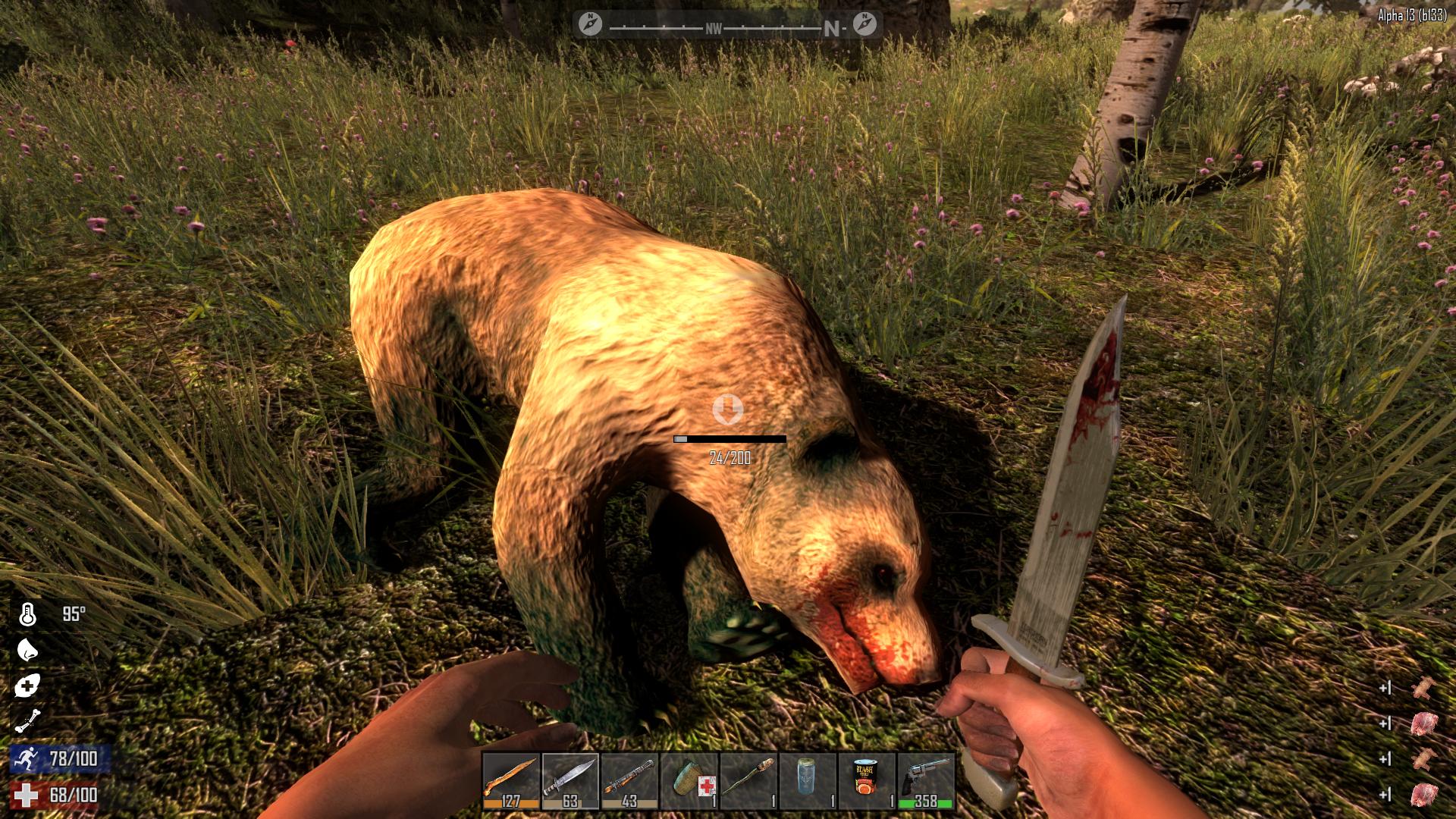
- New Zombies, High-Res Zombies and Animals – We have 5 new base male and 3 new base female high res zombies, a new high res nurse, a new high res frozen lumberjack, and a new hd crawler. Basically all zombies are high res now and the apocalypse never looked so sexy! If that wasn’t enough we’ve added a new Screamer Zombie that investigates world heat map locations that are too hot based on noise, smells and activity so the spider zombie has returned to a normal zombie in the spawning mix. We’ve also added zombie bears to the game be very careful with these guys they will fuck you and your fort up. Last of all we’ve added chickens to the game for another source of meat, feathers and eggs their finger licking good.
- Motion Capture Zombie Animations – We’ve integrated a complete set of new motion capture animations for the zombies that are root motion driven. Meaning they are anchored to the world and their animations drive their motion and speed. The set includes per region pain animations, jumps, attacks, bites, dramatic deaths and a new death to ragdoll animation transition system. There are several variants of walk and run including fit, fat, convulsions, strong and crawl as well as a custom spider zombie moving on all 4s set.
- Zombie Dismemberment System – We’ve added a brand new cutting edge dismemberment system. The system allows players under the right weapon conditions to lop-off with a melee weapon or shoot off with a firearm a zombie’s limb at the elbow, shoulder, knee or hip and take off their heads. Zombies keep coming until their head is taken off or the damage given meets the required damage threshold. Damage to zombie arms/legs cannot kill the zombie, only direct damage to head/chest can kill it now.
- Dynamic Limping and Crippling System – In-conjunction with the new dismemberment system we’ve added a new dynamic limping and crippling. You can attack a zombie legs and their walk can change from normal to a hobbled walk and if you damage them enough they fall to the ground and become a crawling zombie. Spiked traps, landmines, pipe bombs, landmines and fire damage also interact with this system with similar results.
- Knockdown Combat System – We also added a new knockdown combat system that allows player to knock down zombies into prone or kneeling stunned states and deal more damage during these states. With this change health of all zombies have been adjusted up. When a zombie is in the prone stunned state players deal 3X damage and while in the kneeling stunned state deal 2X damage. The system tracks accumulative damage to an upper body knockdown pool for prone knockdown and accumulative damage to a lower body knockdown pool for the kneeling knockdown. For each knockdown pool the damage is accumulative and must reach 0 in a limited time for a knockdown to occur as there is a constant refill rate.
We like it Cold, Hot and Wet! Extreme Weather Survival System
- World Temperature – The world has a global temperature in Fahrenheit Degrees and is displayed in the new map under map stats and can also be seen by hitting F8 in debug mode only. This world temperature fluctuates per biome, per time of day, and gets colder the higher you are and warmer the lower you are. Wind speed can also impact the temperature which is also shown in the map screen maps stats section.
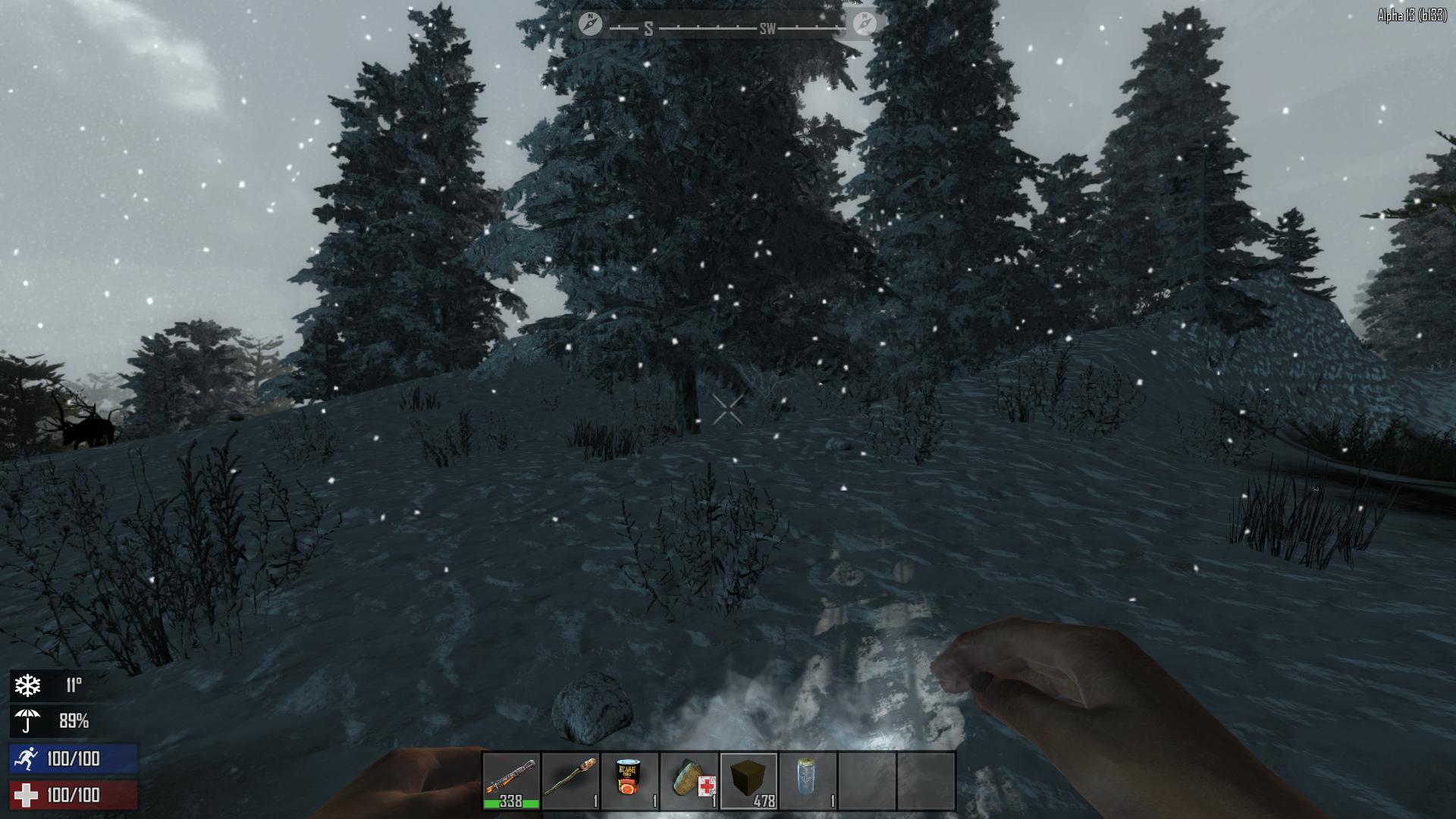
- Player Temperature – The player has a core temperature in Fahrenheit degrees which is the world temperature +/- how it feels to the player and is displayed in the new character menu in the player stats section next to the thermometer icon.This can also be seen by hitting F8 in debug mode only. When the player gets too cold a snowflake buff displays in the lower right corner of the screen with the players core temperature next to it warning the player of his current status. When the player gets too hot a sun buff displays in the lower right corner of the screen with the players core temperature next to it warning the player of his current status. These buffs can also be seen and examined in the new active buffs panel in the new character screen.
- Player Wetness – The player can get wet by moving through water volumes in the world or by being exposed to rain or snow overtime. The more the player submerges himself in water or the longer he is exposed to rain or snow the higher the wetness % goes up to 100%. When the player gets wet an umbrella buff displays in the lower right corner of the screen with the players wetness % next to it warning the player of his current status.
- Temperature and Wetness Defense – All clothing has a positive or negative insulation degree value which can be seen by left clicking an item and examining it which displays the stats in a new Item info window above the backpack. Most items have a positive insulation defense value but a few are special and have a negative value for hot weather survival. Some clothing have a waterproof defense % which can be seen by left clicking an item and examining it which displays the stats in a new Item info window above the backpack with full item stats. A players total summed Insulation and Waterproof values can be seen in the new character screen in the upper left of the character window next to the thermometer and umbrella icons.
- Temperature Modifiers
- Wearing clothing that has a negative insulation value will cool down the player and is desirable for hot weather survival. F.E. the cowboy hat keeps the player cooler in the desert.
- Wearing clothing that has a positive insulation value will warm the player and is desirable for cold weather survival.
- Getting wet by moving through lakes, rain, or snow will make the player wet and colder when he’s cold and cool the player down when he’s hot.
- Activity that uses stamina, like running or swinging a pickaxe, will warm up the player.
- Standing near a campfire or forge that is burning will warm up the player.
- All clothing will have a waterproof % capping how wet the player can get.
- Going indoors will warm you when you’re cold and cool you when you are hot.
- Exposure to direct sunlight will warm, and shade will cool, the player.
- Some foods and drinks have temporary core temp warming or cooling properties. F.E. drinking coffee warms you while water and goldenrod tea will cool you.
- Wind speed can also cool the player down and will be seen in the new map screen under map stats.
- Wearing clothing that has a negative insulation value will cool down the player and is desirable for hot weather survival. F.E. the cowboy hat keeps the player cooler in the desert.
- Wearing clothing that has a positive insulation value will warm the player and is desirable for cold weather survival.
- Getting wet by moving through lakes, rain, or snow will make the player wet and colder when he’s cold and cool the player down when he’s hot.
- Activity that uses stamina, like running or swinging a pickaxe, will warm up the player.
- Standing near a campfire or forge that is burning will warm up the player.
- All clothing will have a waterproof % capping how wet the player can get.
- Going indoors will warm you when you’re cold and cool you when you are hot.
- Exposure to direct sunlight will warm, and shade will cool, the player.
- Some foods and drinks have temporary core temp warming or cooling properties. F.E. drinking coffee warms you while water and goldenrod tea will cool you.
- Wind speed can also cool the player down and will be seen in the new map screen under map stats.
Harvest and Universal Block Upgrade System
- Harvest System – We’ve overhauled block health so everything in the world from a wood wall to a deer carcass has a health and when attacked decreases and adds resources into the player’s inventory automatically showing both added and dropped inventory changes with a GUI informational pop-out on the bottom right corner! The system is global giving the player the right feedback and additionally allows the player to yield bonus items when using the right tool for the right job. For Example using a wrench to take apart a car or air conditioner or using a knife to harvest a deer can yield special bonus items or larger yields. The system also communicates resources removed or needed when attempting to repair or upgrade blocks. Note: With the introduction of harvest and crafting list we have had to majorly change the amount of resources the player receives from wood, stone, metal, clay basically everything and the costs for crafting them so a lot of rebalance has gone into this.
- Universal Block Upgrading – We’ve added a universal block upgrading system. With it nearly every block in the game can be upgraded if the player has a construction class tool such as a Stone Ax, Wrench, Claw Hammer or Nail gun and the right resources such as wood or scrap iron on his person. The game knows what a blocks core materials are to start with such as wood or brick and takes it to the next higher tier in the games overall upgrade hierarchy. This allows players to take over locations easier and save them the trouble of tediously tearing out a block to upgrade it unless it’s part of a new floorplan design. Not to worry we have maintained our old building system so you can still build and the old way. This includes every door, window, most full size wall blocks, roofing blocks and more.
- Block Upgrade Hierarchy – So the overall upgrade system hierarchy is listed below including 1 meter blocks, stairs, roofs, poles, windows and doors. Building has never been more fun!
- Wood blocks upgrades to reinforced wood blocks by right clicking with a repair tool and using wood resource
- Reinforced wood blocks upgrade to metal reinforced wood by right clicking with a repair tool and using scrap iron.
- Metal reinforced wood blocks upgrade to a scrap iron blocks by right clicking with a repair tool and using scrap iron.
- Scrap iron blocks upgrade to a reinforced scrap iron blocks by right clicking with a repair tool and using scrap iron.
- Reinforced scrap iron blocks upgrade to a reinforced concrete block by right clicking with a repair tool and using concrete mix.
- Reinforced concrete walls upgrade to steel walls by right clicking with a repair tool and using forged steel.
- Wood blocks upgrades to reinforced wood blocks by right clicking with a repair tool and using wood resource
- Reinforced wood blocks upgrade to metal reinforced wood by right clicking with a repair tool and using scrap iron.
- Metal reinforced wood blocks upgrade to a scrap iron blocks by right clicking with a repair tool and using scrap iron.
- Scrap iron blocks upgrade to a reinforced scrap iron blocks by right clicking with a repair tool and using scrap iron.
- Reinforced scrap iron blocks upgrade to a reinforced concrete block by right clicking with a repair tool and using concrete mix.
- Reinforced concrete walls upgrade to steel walls by right clicking with a repair tool and using forged steel.
Brand New GUI with added functionality and Skill System
- New Inventory controls – Ok before you get on our case about changing inventory controls please try it and give it a chance. Your muscle memory will fight you at first but after you get use to the new controls we think you’ll like it. We had to change them to allow item inspection and actions to be done from a static window. So here are the new controls:
- [Left Click] to inspect an item, recipe or active effect
- [Left Click] hold and drag to take a stack
- [Left Click] to drop or swap a stack
- [Right Click] hold and drag to take a half stack
- [Right Click] to drop one item at a time
- New Clean GUI Design Framework – The first thing you’ll notice is the minimalistic new clean design. The minimalistic design is more immersive improving flow and conveying needed information better displaying it all in one large page not sub-pages under sub menus. Even veteran players will appreciate the new flow and ease of use. Our team members have even commented that they find themselves crafting items they never knew existed. The system will allow us to iterate much faster and add new stations quicker and provide a great framework for mod support. In the video options we’ve added UI background and UI foreground opacity with defaults of 50% for background and 100% for foreground which can be tweaked to your liking. Note: there are some minor issues and elements to be grouped with this.
- Paging System – We have integrated a new global player inventory paging system accessed by hitting the ‘Tab’ key. The new paging navigation system is located at the top center of the screen and clicking on the icons switches between crafting, character, map, skills, players, and creative screens. The old short cuts still exist ‘m’ key for map, ‘I’ key for the scoreboard which is now the player’s screen, ‘U’ for the creative and new ones ‘B’ for character screen and lastly ‘N’ for skills all of which can be rebound to your liking.
- Item info window – We have added an item info window that appears on every screen that the players backpack does right above it. With it you can read descriptions and stats for every item, recipe, skill or buff in the game and where applicable perform actions taking the place of the old right click menu. Note: We have done a first pass on descriptions buffs and skills all have descriptions and most items you can loot, or make have them except for some of the misc. décor type items.
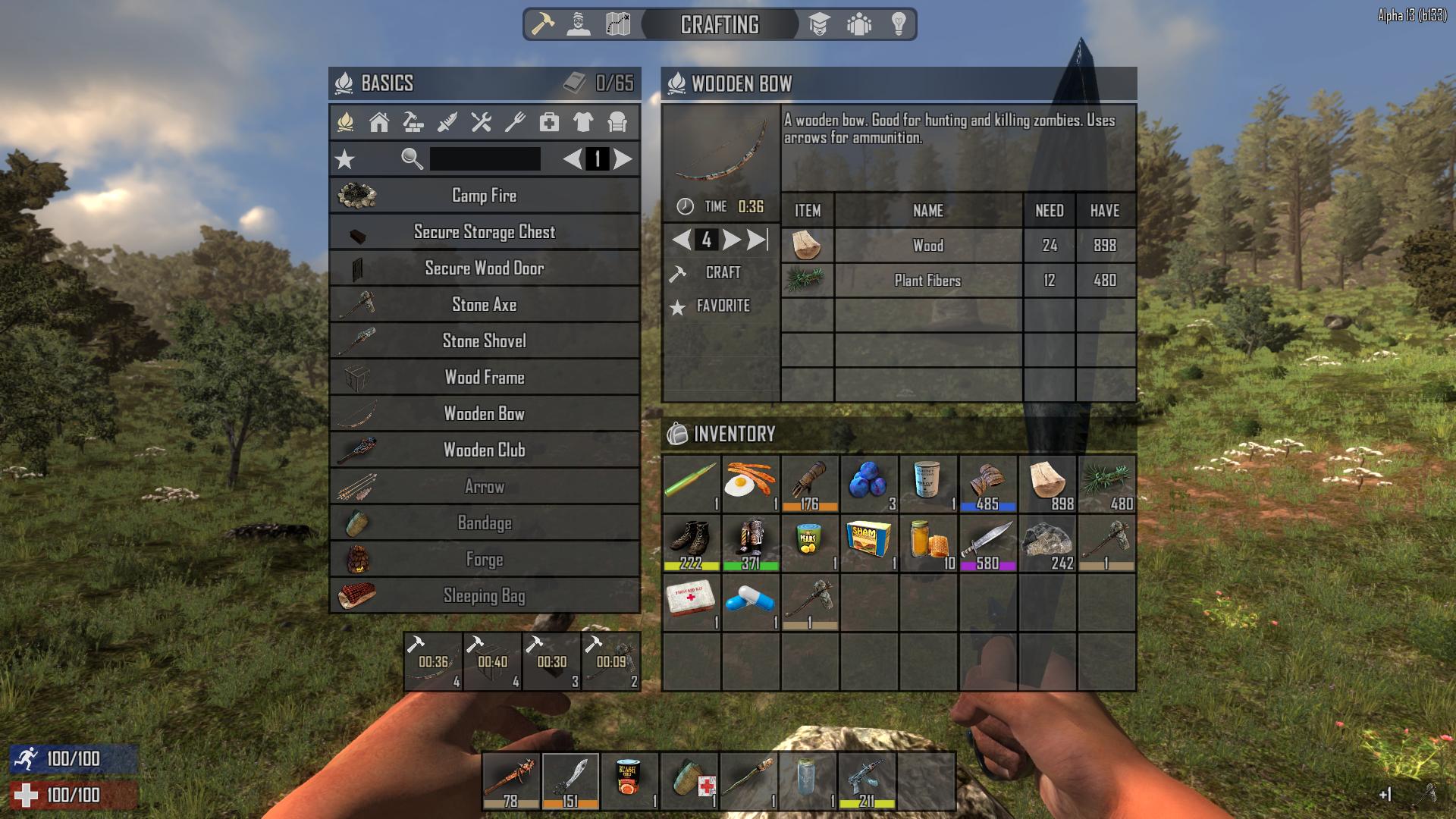
- Crafting System – The new crafting system can be accessed by hitting the ‘Tab’ key or the crafting icon in the new paging system header. The crafting system has been overhauled with a large generous recipe window on the left which includes a favorite’s button, search and page scrolling. We’ve also added a brand new info window over the backpack which allows item description information to be displayed with a left click. The info window also shows available actions per item such as scrap, drop or equip. When you click on a recipe the info window changes to a crafting window which displays in a table format the recipes required items, names, amounts needed and the amounts you have. In the crafting window action panel you can increment the amount you want up or down or hit the max count button and simply hit craft. The crafted items will go into the crafting queue under the recipe window with a timer and will dump into your backpack when they are done. Up to 4 recipes can be queued at once. You can cancel queued items by clicking on them. Inventory management has been changed to left click to view an item info, left click and drag to take an item , right click and drag to split a stack, right click to drop one item at a time and shift left click to move a stack between spaces.
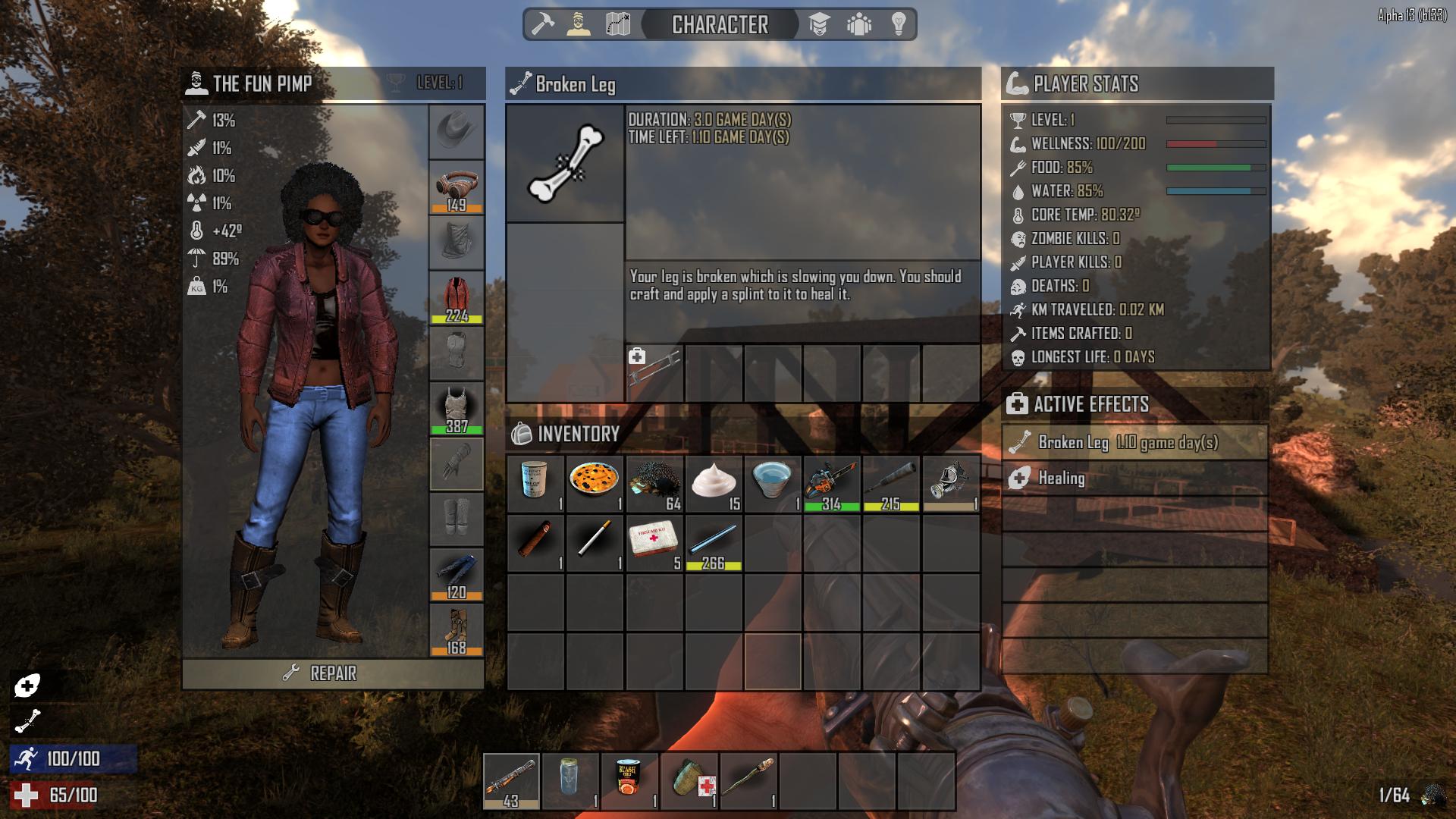
- Character System – The new character system can be accessed by clicking on the character icon in the new paging system header. The new system offers a generous new larger character window to see your character better than ever playing a cool animation with no sub-page clicking to see what you need. On the upper left of the character window you can see your characters total clothing defensive values displayed. We have streamlined these defensive clothing attributes into 7 core groups including: Concussive defense % by the hammer icon, puncture defense % by the knife icon, fire defense % by the fire icon, radiation defense % by the nuclear icon, insulation defense temperature by the thermometer icon, water defense % by the umbrella icon and clothing weight % by the weight icon. Worn clothing can also be individually inspected showing stats in the new info window. We’ve also added a new player stats window with many valuable player stats and a new buff window where active buffs can be viewed and inspected for more information.
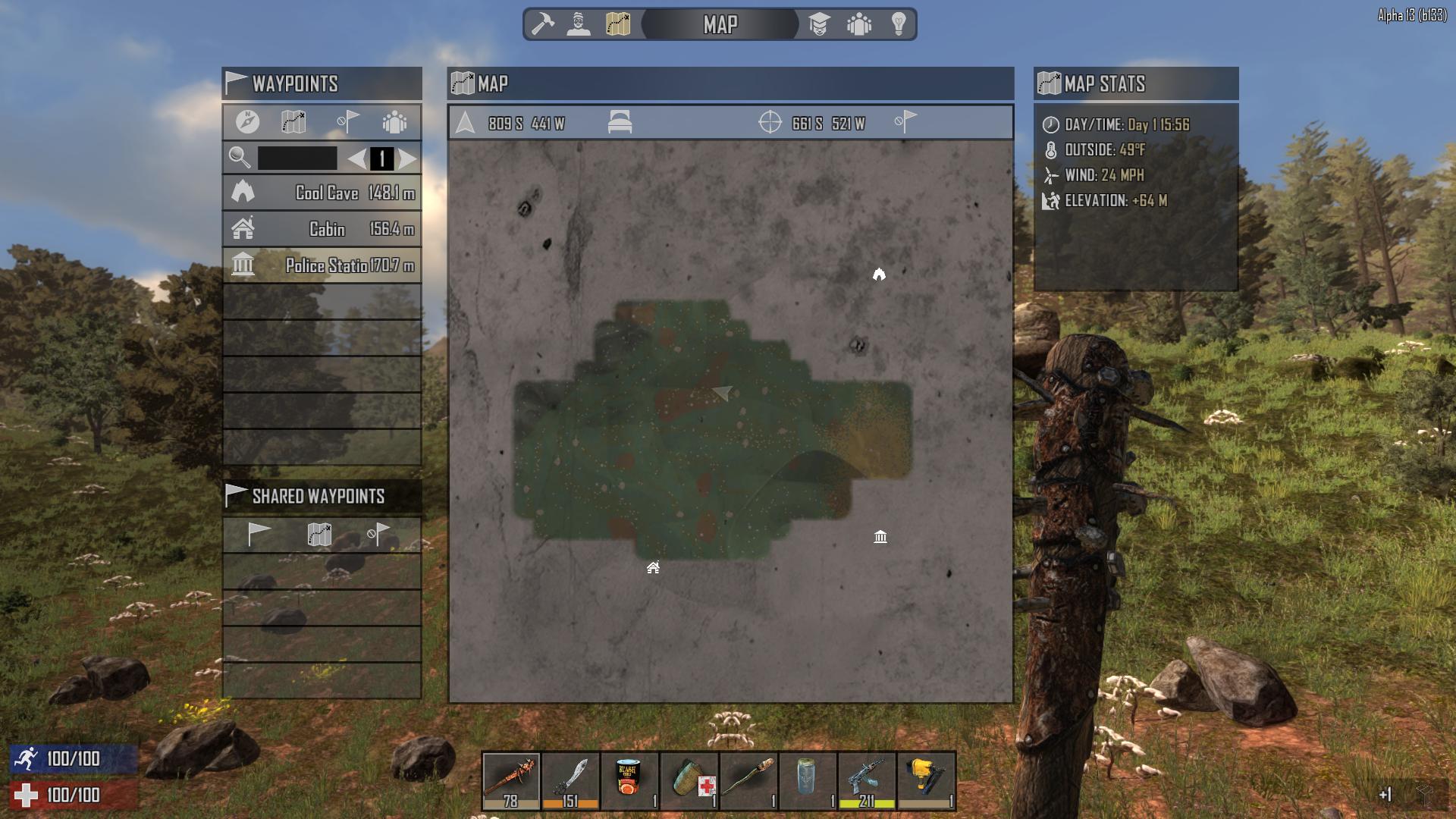
- Map System – The new map screen features everything the old one did and so much more including a full 3 kilometer zoom out. It can still be accessed by ‘M’ shortcut or by clicking on the map icon on the new paging system header. On the top left you’ll notice a new map stats window which displays time and day, outside temp, wind speed and your elevation. The central map window top bar has a row of buttons where you can see your player’s current position, show it on the map, see your bedrolls position and show it on the map, see your cursors position and remove your quick waypoints. When you right click on the map you can set a quick waypoint or save a waypoint picking an icon for it and naming it which adds it into the new waypoint window on the top right. In this waypoint window you can click on a waypoint in the list and in the button bar track it on your compass, show it on your map, remove it from your saved waypoints or share it with allies or everyone on the server. These shared waypoints will go out to others who will receive them in the new waypoint invites window on the lower right. Here you can add the waypoint to your waypoint list, show it on the map or remove it. Who needs google maps with a system like this?
- [Left Click] to inspect an item, recipe or active effect
- [Left Click] hold and drag to take a stack
- [Left Click] to drop or swap a stack
- [Right Click] hold and drag to take a half stack
- [Right Click] to drop one item at a time
Saturday, October 24, 2015
7 Days to Die Alpha 13: All Dramatically Improvements and Updates
The release for Alpha 13 is almost near. The fun pimps spoiled us with an update or new alpha every 5 weeks, so this long wait really is having gamers wondering what have they been doing that could take this long. Here is a sneak peak of what to expect in 7 Days to Die: Alpha 13.
Hit Points, and Cars, and new Guns
Tracing all of 7 Days to Die 12.5 alphas history of hit points, before, all blocks had 10 hit points and then we used a hardness to say how hard it was. In the end it was really just a bunch of math that made it difficult to balance the game and also made it impossible for us to really display a health bar for blocks. Now each block shows a hit point value as you harvest it, and you can see how effective your tools are and the impact low stamina has on damage too, feedback that was always invisible before. Plus you will get a feeling for what blocks are the strongest in the game because well, stats are awesome.
Cars are now harvest-able. Rather than blowing up you can mine them and get metal. But if you are smart, you will use a wrench and disassemble the car to get all kinds of cool parts, like short metal pipes, springs (now required to make a blunderbuss), cloth, small engines, batteries, radiators and more. You can still loot them too, but the loot isn’t guaranteed like before, since you can harvest them, and now that they aren’t entities (eating collisoin and server cpu).
Speaking of the blunderbuss, its now the most powerful shotgun in the game, followed by the sawed off, and then the long barrel pump. Of course range and reload time make a big difference, but for up close one shots, the blunderbuss is king. Also, a badass home made looking rocket launcher is being introduced in the alpha 13 update. I hope it makes a better impact than the explosive arrows. All the arrows did was blow holes in the ground and attract the annoying spider zombies that would scream and unleash a flood of zombie hordes.
A welcomed additional feature will be flooded basements! Now, underwater exploration in looting is added as well. Instead of water destroying anything in its path, water only floods over items realistically. Under water exploration could be dangerous though, you never know what you might find.
They added dismemberment of limbs. You can dynamically cripple enemies by shooting or cutting off a limb in combat. You can continue to cut pieces off even if they're more dead...well completely dead we are fighting zombies, lol.
Melee will be an worthwhile investment in Alpha 13. Here is the first look of the new machete. Looks like a machete will be useful when dealing with the modifications and animations made to the improved zombies.
As seen in other games like ARK cold weather survival will present a new challenge. The entire world has a global temperature and then each biome has a modifier, as well as time of day, wind, sunny or cloudy all influence the perceived temperature.
In order to cope with the cold weather survival system clothing has been upgraded with stats that will play a factor in conducting heat and improving defense. The starter gear will be the same plant fiber armor we have seen in prior games.
You can upgrade everything: floors, doors, walls and window to the steel level. On the right side of the screen you will see the upgrade cost and materials needed for upgrading. You can take an dilapidated home and upgrade it to something livable or a complete steel fallout shelter.
Saturday, August 22, 2015
7 Days to Die: Alpha 13 News!
Happy 2 years anniversary to the game 7 Days to Die. There is a debate on if the fun pimps will continue the trend and make an Alpha 12.5 patch or jump straight to Alpha 13.0. From what I'm reading on the developers website, I would say that we shouldn't hold our breathe for the 12.5. I'm thinking that 13.0 is the project developers are focusing their attention on. I got a lot of credit and subscribers last time for predicting the release date and info for 7 Days to Die Alpha 12.4 patch. Here is the news I found out about Alpha 13.0.
Developers are working on a tool which lets us see a map view of a random gen world very quickly. This will be invaluable for us to fine tune roads, poi distributions, biome placements, rivers, lakes everything.
Monday, July 27, 2015
7 Days to Die 3 Most Powerful Enemies
I took a poll earlier, and I ranked the three most powerful enemies in 7 Days to Die according to your feedback.
1. Trees- I'm not joking death by falling trees glitch is highest among gamers. The fun pimps really need to fix that before the game becomes pvp.
2. Dogs - the second toughest enemy in the game was reported to be the dogs. Dogs can dodge like pro athletes, chase unrelentingly, and have an invisible 10 foot deadly attack range.
3. Feral zombies- loaded with high levels of HP and attack power the feral zombies can do damage quick. Feral zombies are Usually found in caves or random spawns in the later day 7 hordes. They are worth killing because they give rare loot like magnum gun parts which are the best weapons in the game in my opinion.
Good hunting gamers. And don't forget to use the spike leveling up trick to get your player at optimum Levels fast.
Subscribe to:
Posts (Atom)
Destiny 2 season 18: Release date, Arc 3.0,
The current Season of the Haunted will end on August 23. The usual weekly maintenance happens at 6pm BST (10am PDT, 1pm EDT, 7pm CEST), so...
-
On August 27, 1992, Martin aired its very first episode on Fox, on its way to a 5-season run, finally closing down on May 1, 1997. I w...
-
SUMMER UPDATE Hi everyone in the gaming community! It's been a minute, since I was here. Been on my new job and let's say...