Well the fun pimps finally released
7 Days to Die "Alpha 13"!
Here are some of the features and resources:
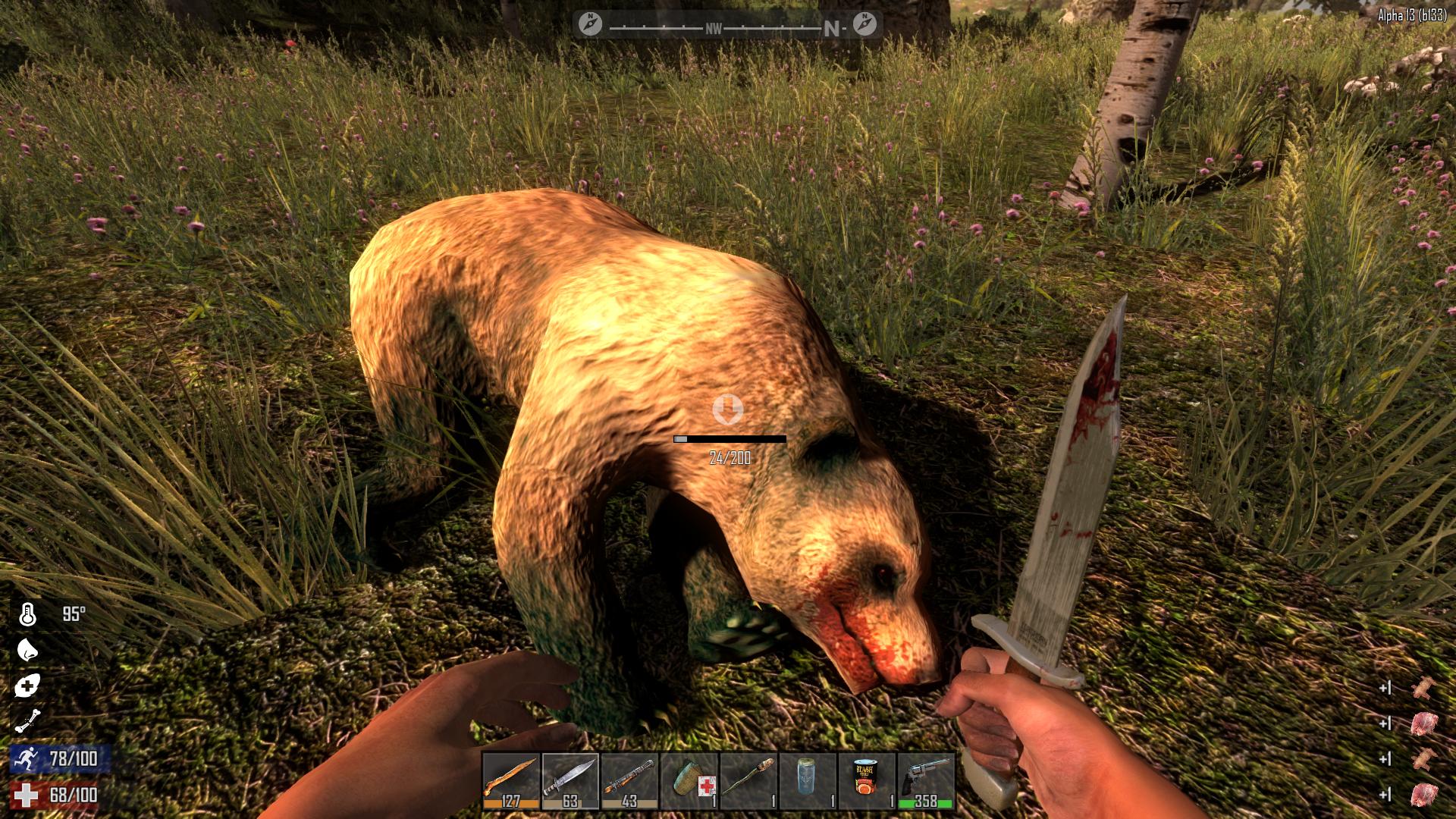
- New Zombies, High-Res Zombies and Animals – We have 5 new base male and 3 new base female high res zombies, a new high res nurse, a new high res frozen lumberjack, and a new hd crawler. Basically all zombies are high res now and the apocalypse never looked so sexy! If that wasn’t enough we’ve added a new Screamer Zombie that investigates world heat map locations that are too hot based on noise, smells and activity so the spider zombie has returned to a normal zombie in the spawning mix. We’ve also added zombie bears to the game be very careful with these guys they will fuck you and your fort up. Last of all we’ve added chickens to the game for another source of meat, feathers and eggs their finger licking good.
- Motion Capture Zombie Animations – We’ve integrated a complete set of new motion capture animations for the zombies that are root motion driven. Meaning they are anchored to the world and their animations drive their motion and speed. The set includes per region pain animations, jumps, attacks, bites, dramatic deaths and a new death to ragdoll animation transition system. There are several variants of walk and run including fit, fat, convulsions, strong and crawl as well as a custom spider zombie moving on all 4s set.
- Zombie Dismemberment System – We’ve added a brand new cutting edge dismemberment system. The system allows players under the right weapon conditions to lop-off with a melee weapon or shoot off with a firearm a zombie’s limb at the elbow, shoulder, knee or hip and take off their heads. Zombies keep coming until their head is taken off or the damage given meets the required damage threshold. Damage to zombie arms/legs cannot kill the zombie, only direct damage to head/chest can kill it now.
- Dynamic Limping and Crippling System – In-conjunction with the new dismemberment system we’ve added a new dynamic limping and crippling. You can attack a zombie legs and their walk can change from normal to a hobbled walk and if you damage them enough they fall to the ground and become a crawling zombie. Spiked traps, landmines, pipe bombs, landmines and fire damage also interact with this system with similar results.
- Knockdown Combat System – We also added a new knockdown combat system that allows player to knock down zombies into prone or kneeling stunned states and deal more damage during these states. With this change health of all zombies have been adjusted up. When a zombie is in the prone stunned state players deal 3X damage and while in the kneeling stunned state deal 2X damage. The system tracks accumulative damage to an upper body knockdown pool for prone knockdown and accumulative damage to a lower body knockdown pool for the kneeling knockdown. For each knockdown pool the damage is accumulative and must reach 0 in a limited time for a knockdown to occur as there is a constant refill rate.
We like it Cold, Hot and Wet! Extreme Weather Survival System

- World Temperature – The world has a global temperature in Fahrenheit Degrees and is displayed in the new map under map stats and can also be seen by hitting F8 in debug mode only. This world temperature fluctuates per biome, per time of day, and gets colder the higher you are and warmer the lower you are. Wind speed can also impact the temperature which is also shown in the map screen maps stats section.
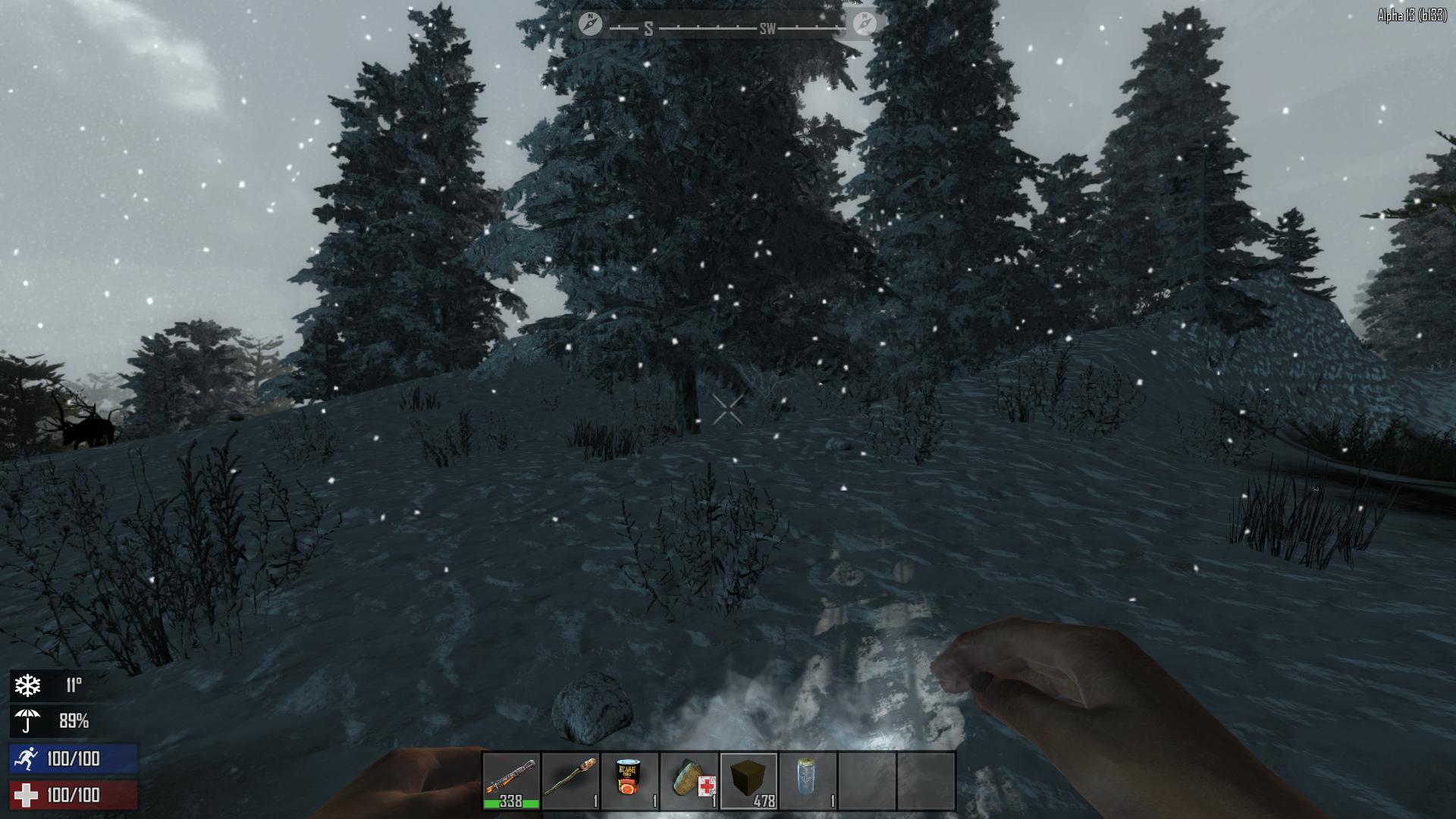
- Player Temperature – The player has a core temperature in Fahrenheit degrees which is the world temperature +/- how it feels to the player and is displayed in the new character menu in the player stats section next to the thermometer icon.This can also be seen by hitting F8 in debug mode only. When the player gets too cold a snowflake buff displays in the lower right corner of the screen with the players core temperature next to it warning the player of his current status. When the player gets too hot a sun buff displays in the lower right corner of the screen with the players core temperature next to it warning the player of his current status. These buffs can also be seen and examined in the new active buffs panel in the new character screen.
- Player Wetness – The player can get wet by moving through water volumes in the world or by being exposed to rain or snow overtime. The more the player submerges himself in water or the longer he is exposed to rain or snow the higher the wetness % goes up to 100%. When the player gets wet an umbrella buff displays in the lower right corner of the screen with the players wetness % next to it warning the player of his current status.
- Temperature and Wetness Defense – All clothing has a positive or negative insulation degree value which can be seen by left clicking an item and examining it which displays the stats in a new Item info window above the backpack. Most items have a positive insulation defense value but a few are special and have a negative value for hot weather survival. Some clothing have a waterproof defense % which can be seen by left clicking an item and examining it which displays the stats in a new Item info window above the backpack with full item stats. A players total summed Insulation and Waterproof values can be seen in the new character screen in the upper left of the character window next to the thermometer and umbrella icons.
- Temperature Modifiers
- Wearing clothing that has a negative insulation value will cool down the player and is desirable for hot weather survival. F.E. the cowboy hat keeps the player cooler in the desert.
- Wearing clothing that has a positive insulation value will warm the player and is desirable for cold weather survival.
- Getting wet by moving through lakes, rain, or snow will make the player wet and colder when he’s cold and cool the player down when he’s hot.
- Activity that uses stamina, like running or swinging a pickaxe, will warm up the player.
- Standing near a campfire or forge that is burning will warm up the player.
- All clothing will have a waterproof % capping how wet the player can get.
- Going indoors will warm you when you’re cold and cool you when you are hot.
- Exposure to direct sunlight will warm, and shade will cool, the player.
- Some foods and drinks have temporary core temp warming or cooling properties. F.E. drinking coffee warms you while water and goldenrod tea will cool you.
- Wind speed can also cool the player down and will be seen in the new map screen under map stats.
- Wearing clothing that has a negative insulation value will cool down the player and is desirable for hot weather survival. F.E. the cowboy hat keeps the player cooler in the desert.
- Wearing clothing that has a positive insulation value will warm the player and is desirable for cold weather survival.
- Getting wet by moving through lakes, rain, or snow will make the player wet and colder when he’s cold and cool the player down when he’s hot.
- Activity that uses stamina, like running or swinging a pickaxe, will warm up the player.
- Standing near a campfire or forge that is burning will warm up the player.
- All clothing will have a waterproof % capping how wet the player can get.
- Going indoors will warm you when you’re cold and cool you when you are hot.
- Exposure to direct sunlight will warm, and shade will cool, the player.
- Some foods and drinks have temporary core temp warming or cooling properties. F.E. drinking coffee warms you while water and goldenrod tea will cool you.
- Wind speed can also cool the player down and will be seen in the new map screen under map stats.
Harvest and Universal Block Upgrade System

- Harvest System – We’ve overhauled block health so everything in the world from a wood wall to a deer carcass has a health and when attacked decreases and adds resources into the player’s inventory automatically showing both added and dropped inventory changes with a GUI informational pop-out on the bottom right corner! The system is global giving the player the right feedback and additionally allows the player to yield bonus items when using the right tool for the right job. For Example using a wrench to take apart a car or air conditioner or using a knife to harvest a deer can yield special bonus items or larger yields. The system also communicates resources removed or needed when attempting to repair or upgrade blocks. Note: With the introduction of harvest and crafting list we have had to majorly change the amount of resources the player receives from wood, stone, metal, clay basically everything and the costs for crafting them so a lot of rebalance has gone into this.
- Universal Block Upgrading – We’ve added a universal block upgrading system. With it nearly every block in the game can be upgraded if the player has a construction class tool such as a Stone Ax, Wrench, Claw Hammer or Nail gun and the right resources such as wood or scrap iron on his person. The game knows what a blocks core materials are to start with such as wood or brick and takes it to the next higher tier in the games overall upgrade hierarchy. This allows players to take over locations easier and save them the trouble of tediously tearing out a block to upgrade it unless it’s part of a new floorplan design. Not to worry we have maintained our old building system so you can still build and the old way. This includes every door, window, most full size wall blocks, roofing blocks and more.
- Block Upgrade Hierarchy – So the overall upgrade system hierarchy is listed below including 1 meter blocks, stairs, roofs, poles, windows and doors. Building has never been more fun!
- Wood blocks upgrades to reinforced wood blocks by right clicking with a repair tool and using wood resource
- Reinforced wood blocks upgrade to metal reinforced wood by right clicking with a repair tool and using scrap iron.
- Metal reinforced wood blocks upgrade to a scrap iron blocks by right clicking with a repair tool and using scrap iron.
- Scrap iron blocks upgrade to a reinforced scrap iron blocks by right clicking with a repair tool and using scrap iron.
- Reinforced scrap iron blocks upgrade to a reinforced concrete block by right clicking with a repair tool and using concrete mix.
- Reinforced concrete walls upgrade to steel walls by right clicking with a repair tool and using forged steel.
- Wood blocks upgrades to reinforced wood blocks by right clicking with a repair tool and using wood resource
- Reinforced wood blocks upgrade to metal reinforced wood by right clicking with a repair tool and using scrap iron.
- Metal reinforced wood blocks upgrade to a scrap iron blocks by right clicking with a repair tool and using scrap iron.
- Scrap iron blocks upgrade to a reinforced scrap iron blocks by right clicking with a repair tool and using scrap iron.
- Reinforced scrap iron blocks upgrade to a reinforced concrete block by right clicking with a repair tool and using concrete mix.
- Reinforced concrete walls upgrade to steel walls by right clicking with a repair tool and using forged steel.
Brand New GUI with added functionality and Skill System

- New Inventory controls – Ok before you get on our case about changing inventory controls please try it and give it a chance. Your muscle memory will fight you at first but after you get use to the new controls we think you’ll like it. We had to change them to allow item inspection and actions to be done from a static window. So here are the new controls:
- [Left Click] to inspect an item, recipe or active effect
- [Left Click] hold and drag to take a stack
- [Left Click] to drop or swap a stack
- [Right Click] hold and drag to take a half stack
- [Right Click] to drop one item at a time
- New Clean GUI Design Framework – The first thing you’ll notice is the minimalistic new clean design. The minimalistic design is more immersive improving flow and conveying needed information better displaying it all in one large page not sub-pages under sub menus. Even veteran players will appreciate the new flow and ease of use. Our team members have even commented that they find themselves crafting items they never knew existed. The system will allow us to iterate much faster and add new stations quicker and provide a great framework for mod support. In the video options we’ve added UI background and UI foreground opacity with defaults of 50% for background and 100% for foreground which can be tweaked to your liking. Note: there are some minor issues and elements to be grouped with this.
- Paging System – We have integrated a new global player inventory paging system accessed by hitting the ‘Tab’ key. The new paging navigation system is located at the top center of the screen and clicking on the icons switches between crafting, character, map, skills, players, and creative screens. The old short cuts still exist ‘m’ key for map, ‘I’ key for the scoreboard which is now the player’s screen, ‘U’ for the creative and new ones ‘B’ for character screen and lastly ‘N’ for skills all of which can be rebound to your liking.
- Item info window – We have added an item info window that appears on every screen that the players backpack does right above it. With it you can read descriptions and stats for every item, recipe, skill or buff in the game and where applicable perform actions taking the place of the old right click menu. Note: We have done a first pass on descriptions buffs and skills all have descriptions and most items you can loot, or make have them except for some of the misc. décor type items.
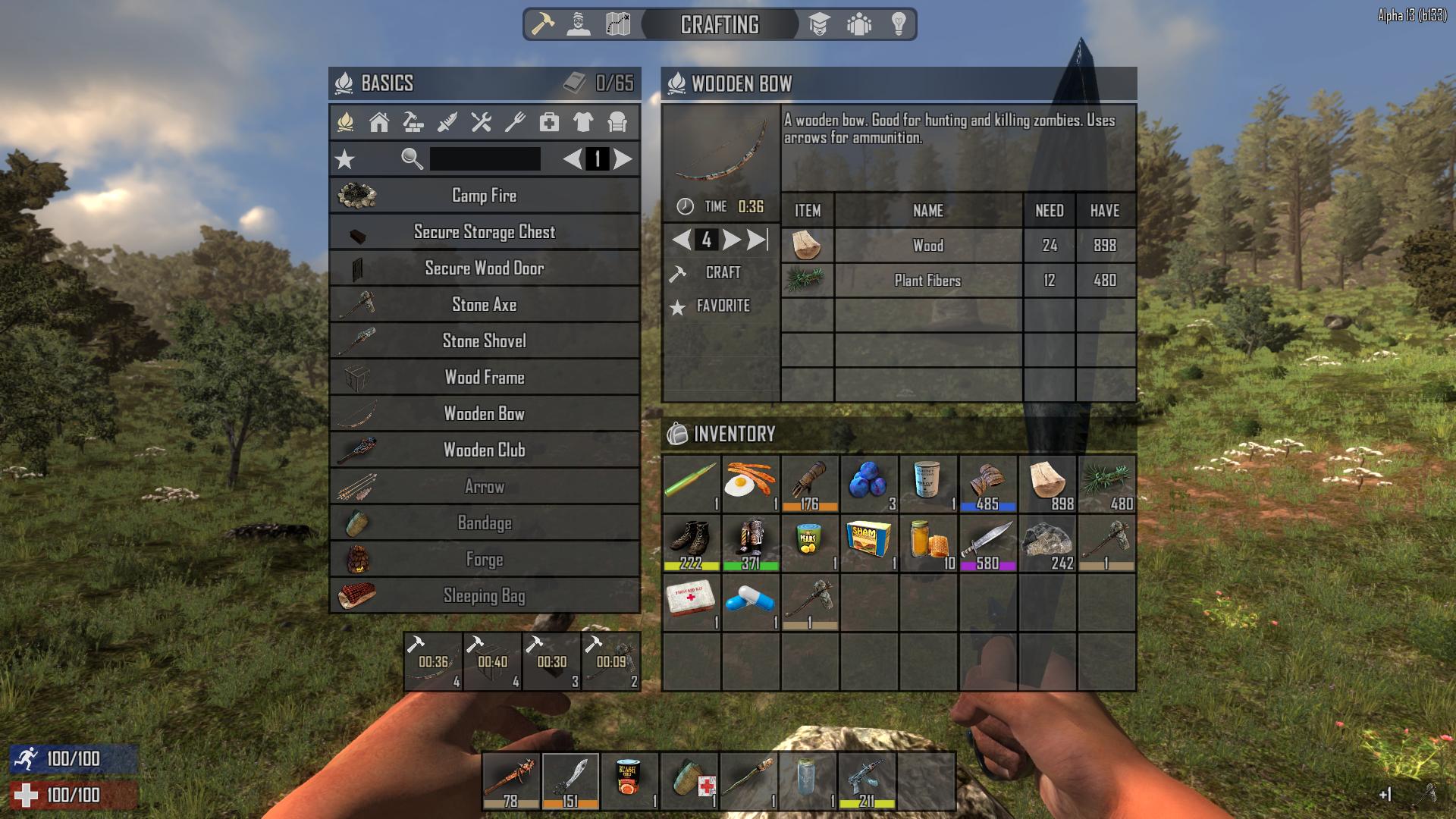
- Crafting System – The new crafting system can be accessed by hitting the ‘Tab’ key or the crafting icon in the new paging system header. The crafting system has been overhauled with a large generous recipe window on the left which includes a favorite’s button, search and page scrolling. We’ve also added a brand new info window over the backpack which allows item description information to be displayed with a left click. The info window also shows available actions per item such as scrap, drop or equip. When you click on a recipe the info window changes to a crafting window which displays in a table format the recipes required items, names, amounts needed and the amounts you have. In the crafting window action panel you can increment the amount you want up or down or hit the max count button and simply hit craft. The crafted items will go into the crafting queue under the recipe window with a timer and will dump into your backpack when they are done. Up to 4 recipes can be queued at once. You can cancel queued items by clicking on them. Inventory management has been changed to left click to view an item info, left click and drag to take an item , right click and drag to split a stack, right click to drop one item at a time and shift left click to move a stack between spaces.

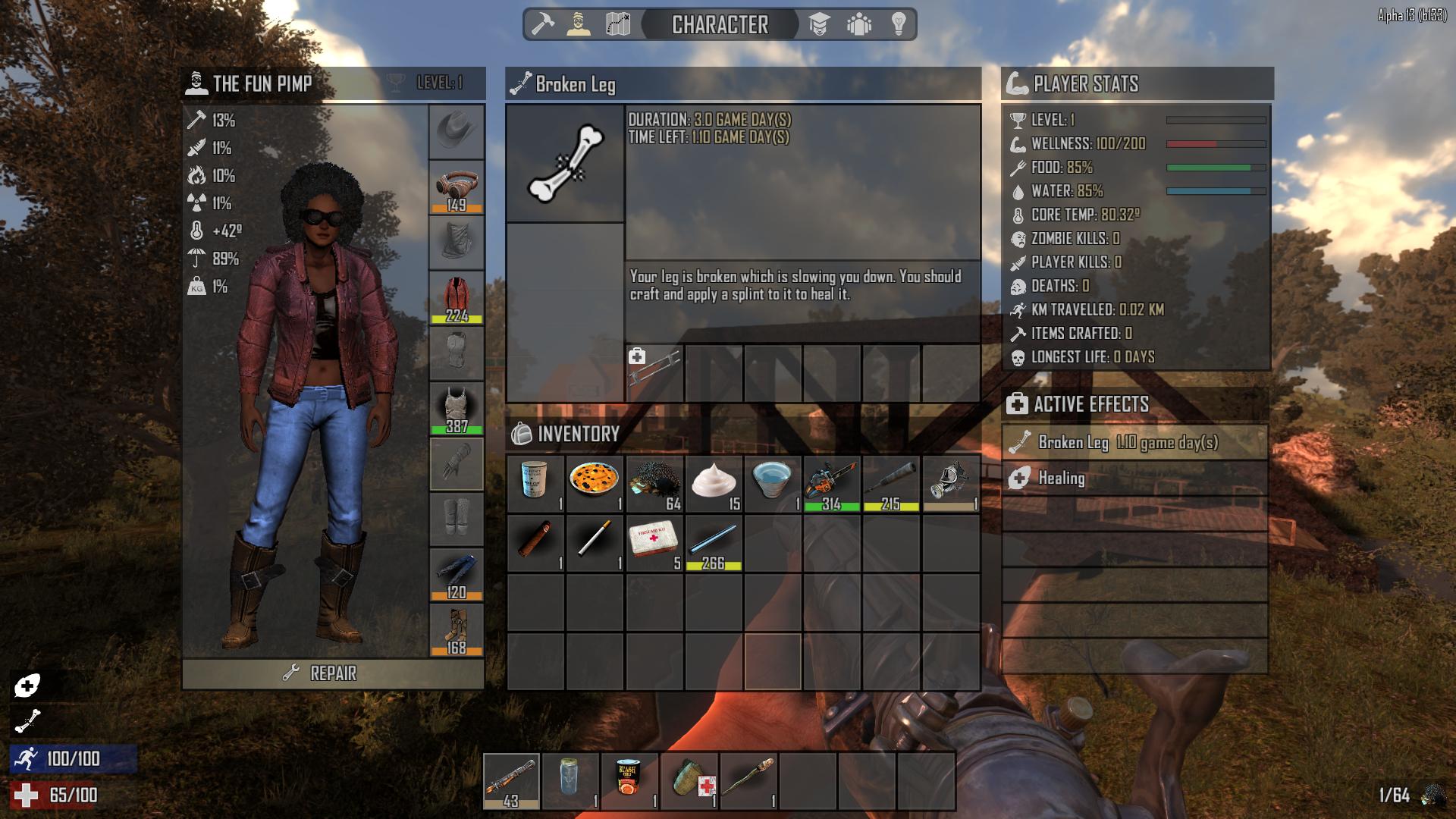
- Character System – The new character system can be accessed by clicking on the character icon in the new paging system header. The new system offers a generous new larger character window to see your character better than ever playing a cool animation with no sub-page clicking to see what you need. On the upper left of the character window you can see your characters total clothing defensive values displayed. We have streamlined these defensive clothing attributes into 7 core groups including: Concussive defense % by the hammer icon, puncture defense % by the knife icon, fire defense % by the fire icon, radiation defense % by the nuclear icon, insulation defense temperature by the thermometer icon, water defense % by the umbrella icon and clothing weight % by the weight icon. Worn clothing can also be individually inspected showing stats in the new info window. We’ve also added a new player stats window with many valuable player stats and a new buff window where active buffs can be viewed and inspected for more information.

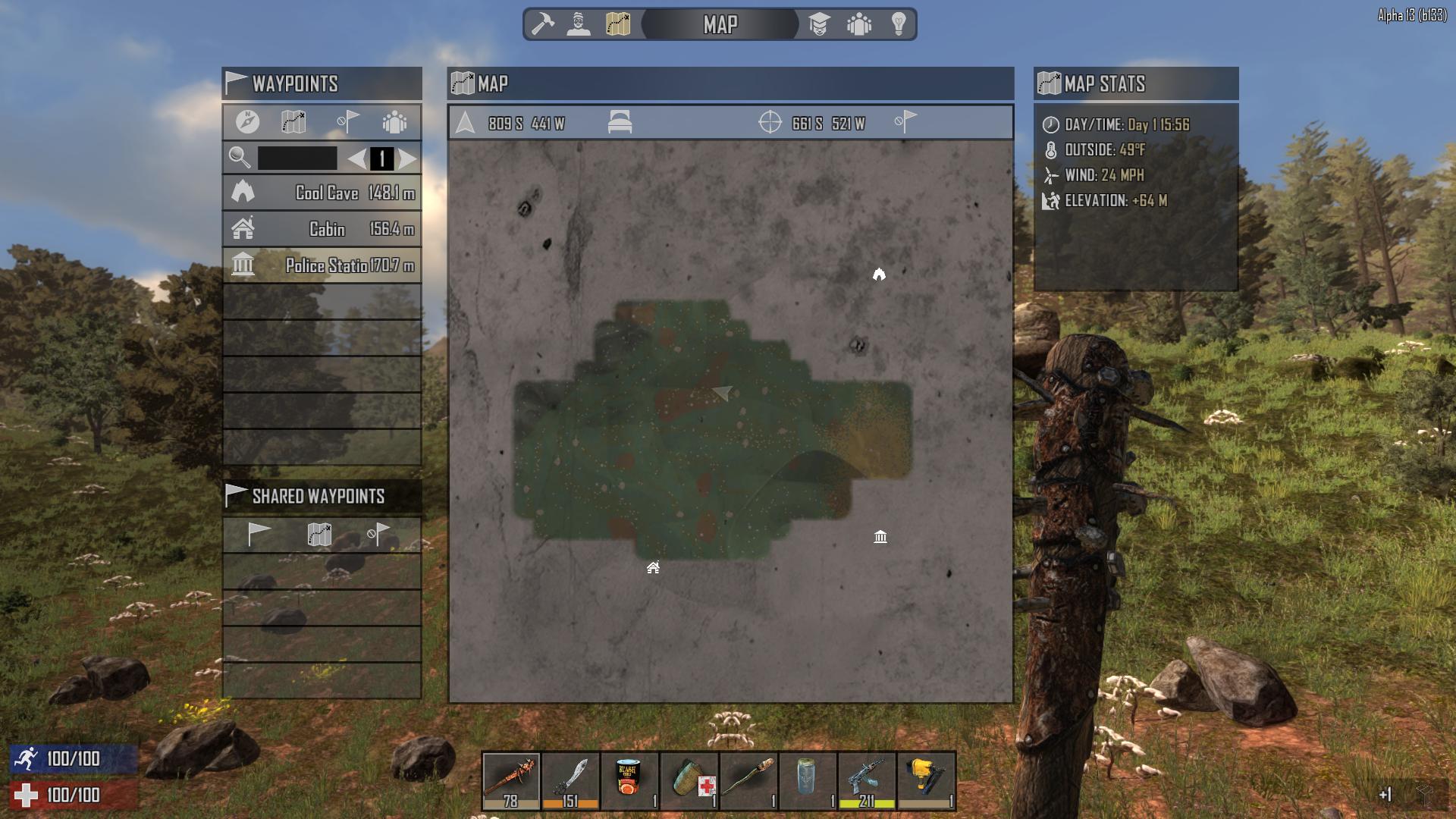
- Map System – The new map screen features everything the old one did and so much more including a full 3 kilometer zoom out. It can still be accessed by ‘M’ shortcut or by clicking on the map icon on the new paging system header. On the top left you’ll notice a new map stats window which displays time and day, outside temp, wind speed and your elevation. The central map window top bar has a row of buttons where you can see your player’s current position, show it on the map, see your bedrolls position and show it on the map, see your cursors position and remove your quick waypoints. When you right click on the map you can set a quick waypoint or save a waypoint picking an icon for it and naming it which adds it into the new waypoint window on the top right. In this waypoint window you can click on a waypoint in the list and in the button bar track it on your compass, show it on your map, remove it from your saved waypoints or share it with allies or everyone on the server. These shared waypoints will go out to others who will receive them in the new waypoint invites window on the lower right. Here you can add the waypoint to your waypoint list, show it on the map or remove it. Who needs google maps with a system like this?


- [Left Click] to inspect an item, recipe or active effect
- [Left Click] hold and drag to take a stack
- [Left Click] to drop or swap a stack
- [Right Click] hold and drag to take a half stack
- [Right Click] to drop one item at a time